
Home › Forums › Renault Android R-Link and Other IVI/Telematics Systems › Lost connectivity
This topic contains 40 replies, has 14 voices, and was last updated by 

-
AuthorPosts
-
January 1, 2014 at 01:46 #6788
An odd one here I’ve so far been unable so solve – any ideas anyone?
For the past week or so parts of the R-Link have been inaccessible. Most obviously the r-link store, the ability to check for software updates and all apps that require a data connection – mail, tom-tom places, weather etc. I’ve also lost scheduled charging.
In the system info the data connection says it has full signal but is ‘disconnected’.
However, HD Traffic still works and I still get emails for charging status and I can still use the web interface and the iPhone app.
I don’t know if this is related but I’ve also found bluetooth audio is stuttering. Almost like something is using lots of the available system resources in the background.
I’ve tried:
turning the data connection off and on again using the connection manager.
system update using the sd card and my laptop.
factory reset.
deleting my profile.
rebooting the r-link by removing the fuse.Nothing has worked. Anyone have any ideas?
I did note that while a factory reset does delete your favourites it doesn’t seem to do much else. All the apps are still there, my profile was still setup and although I had to re-pair my phone as soon as I did so the other devices previously linked suddenly ‘came back’ and appeared in the list.
Checking on the r-link website all my ‘packs’ are still live except the 3-month trial of TomTom Live. I paid for the 3 year bundle so that shouldn’t matter and, ironically, it seems to be the only bit still working!
January 22, 2014 at 13:36 #7038Just a bit of an update on this 🙂
I spoke to the r-link technical people and they went off and investigated for a couple of weeks and came back saying they’ve never seen anything like the kind of communication my r-link is attempting with the central servers. They think either something’s got seriously corrupted or there is a hardware fault so I’ve taken my Zoe for diagnostics checks and a software re-install at Renault Birmingham.
I’ve not yet had a call from them but I noticed that for the first time in weeks my zoe has reported its charge status to the central servers so that sounds promising 🙂
I’ll be picking her up tomorrow morning as I get back from work too late to pick her up this evening.
In the mean time I have a Nissan Note on loan from the dealership and my god, compared to the Zoe it is awful!
January 22, 2014 at 13:55 #7041Just had a call from the Dealer. They’ve run the diagnostics and identified the problem as the telematics unit (known to me as the GPRS unit – the bit the sim card goes in and which links to the mobile network like a phone).
Apparently the R-Link software is fine but because the telematics unit was mis-behaving the R-Link knew to disable all networking features.
The diagnostics apparently showed the telematics unit had frozen and was in a constant re-boot. They don’t know why but it would account for the intermittent connectivity. They’ve reset it (no word on whether a firmware update was applied) and everything seems happy now.
I’ve asked if they can provide me a self-help solution now I know the symptoms so I don’t need to bring the car in if it happens again and he’s going to ask the technical guys. There’s a chance just pulling out the right fuse will do it (different fuse to the r-link, I believe, as I’ve tried the r-link fuse myself) but he’s not sure.
I’ll let everyone know if I’m told a method 🙂
January 22, 2014 at 21:44 #7045I’m glad it got sorted in the end.
January 24, 2014 at 09:55 #7071I have been given some info on how to reset the telematics unit which froze in my car 🙂
So the symptoms are that all network-related functionality on the R-Link is greyed out and you stop seeing status updates on the ZE Services website or charge notifications (see my previous posts for full details).
The solution is to remove the telematics unit fuse for 5 minutes and then replace it.
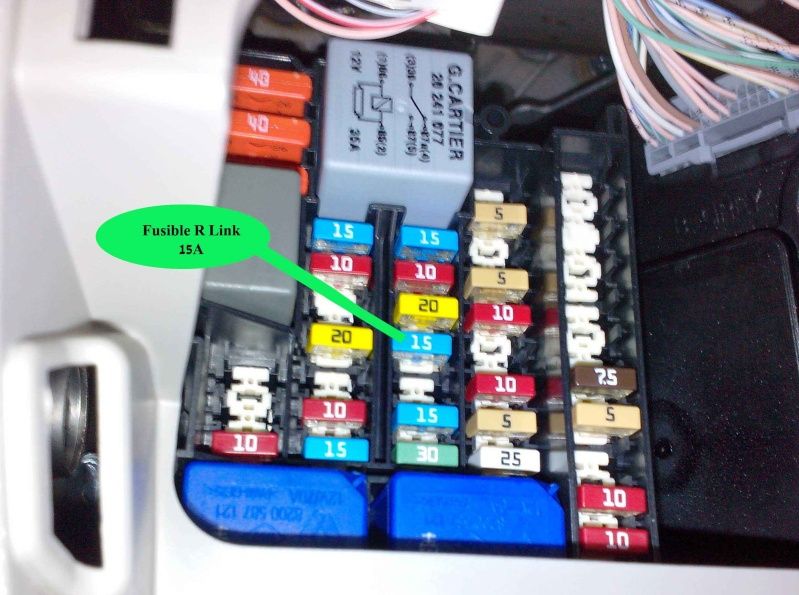
The fuse is number 31 on the ‘standard’ diagram the service guys have. It is a 10 amp fuse, second from the bottom in the second column from the left. For reference, the R-Link fuse is a 5-amp fuse in the 3rd column from the left so if you’ve found that one in the past, you need the next column over 🙂
I’ll take a photo of the diagram and attach it.
January 24, 2014 at 10:05 #7072Ok, so I don’t know if the image has uploaded but here’s a link:

-
This reply was modified 12 years, 2 months ago by
Trevor Larkum. Reason: Embedded image
January 24, 2014 at 10:11 #7073Oh and because I didn’t do it myself I don’t know if you also need to reset the r-link by removing its fuse or whether the r-link detects when the telematics unit is working again automatically.
August 10, 2014 at 16:29 #9509Hi farblue
For the past couple of days I’ve had the same problem with my Zoe – status disconnected, immediate charging despite setting for overnight etc. My Tom Tom, still works etc. So, I tried removing the 10 A telematics fuse for 5 mins. Unfortunately this hasn’t fixed it for me, and I can’t see a 5 A fuse in the 3rd column (perhaps it’s at the top and hidden?) so haven’t been able to reset R-link. This could explain why my reset hasn’t worked?Anyway my Zoe will be going in for it’s annual service this month, so I’ll get the garage to look at it and will give them a few tips from here to get them looking in the right place…
August 10, 2014 at 17:29 #9510Timbo,
I had this problem in June where the network status was always showing DISCONNECTED. My dealer tried the fuse trick above but found that I needed a replacement TCU. After 2 1/2 weeks I got my car back and all was well for a few days but it’s going back tomorrow to the dealers as they need to tweak something R-LINK support want doing….not sure what!!
dbdb
August 11, 2014 at 11:08 #9514And a nice photo
-
This reply was modified 12 years, 2 months ago by
-
AuthorPosts


You must be logged in to reply to this topic.